
Wiki / Privacy and settings
Privacy and settings
Everything you share has its own switch, and so does everything you see. Your choices are yours: the server can switch more off, never more on.
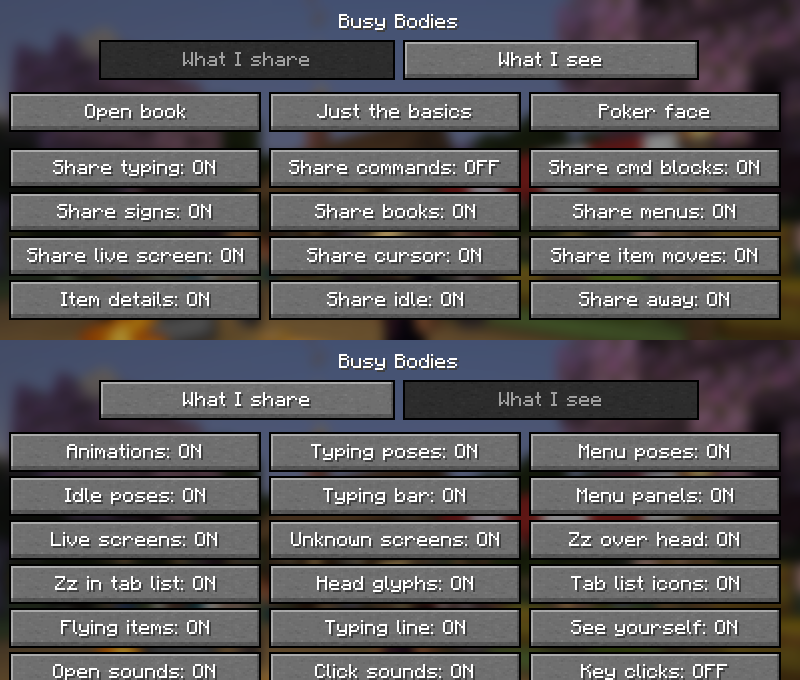
Open the settings with /bb settings, from Mod Menu on Fabric or from the Mods list on NeoForge.
Three presets#
| Preset | Command | Shares |
|---|---|---|
| Open book | /bb privacy open | Everything, except typed commands. |
| Just the basics | /bb privacy basics | That you are typing, in a menu, idle or away. No live picture, no mouse, no items. |
| Poker face | /bb privacy poker | Nothing at all. |
What I share#
| Switch | Starts | What it does |
|---|---|---|
| Share typing | On | Others see that you are typing in chat. |
| Share commands | Off | Also show it when what you type starts with a slash. |
| Share cmd blocks | On | Show the command icon while you edit a command block. |
| Share signs | On | Show the sign icon while you write on a sign. |
| Share books | On | Show the book icon while you write in a book and quill. |
| Share menus | On | Show the panel when you have a menu open. |
| Share live screen | On | Send the small live picture of that menu to players nearby. |
| Share cursor | On | Show where your mouse is on the panel, and your clicks. |
| Share item moves | On | Show items flying when you move them in or out of a container. |
| Item details | On | Send the item's enchantments and custom look too, not only its type. |
| Share idle | On | Others see you glance around, nod off and sleep when you stand still. |
| Share away | On | Others see the clock when you pause or leave the game window. |
What I see#
| Switch | Starts | What it does |
|---|---|---|
| Animations | On | The body movement the mod adds, all of it at once. |
| Typing poses | On | Arms that type. |
| Menu poses | On | Arms that reach for the panel. |
| Idle poses | On | Glancing around, nodding off and sleeping. |
| Typing bar | On | The little text bar in front of a typing player. |
| Menu panels | On | The floating panel in front of a player who has a menu open. |
| Live screens | On | The live picture on that panel. When off, the panel shows an icon. |
| Unknown screens | On | Panels for screens the mod has no icon for. |
| Zz over head | On | The z and zZ over a dozing player. |
| Zz in tab list | On | The zz in the tab list. |
| Head glyphs | On | Icons over heads: speech bubble, book, sign, slash and clock. |
| Tab list icons | On | Small status icons in the tab list. |
| Flying items | On | Items flying between a container and the panel. |
| Typing line | On | The "Alex is typing.." line above your chat box. |
| See yourself | On | Your own poses and panel when you look at yourself in third person. |
| Open sounds | On | A soft sound when a nearby player opens a menu. |
| Click sounds | On | A soft click when they click in it. |
| Key clicks | Off | Key taps while a nearby player types. |
What is never shared#
- What you type. Others learn that you are typing and how fast. The letters they see are random.
- Private screens. Written books, report screens, the social screen and link warnings are never copied.
- Anything, to players without the mod. Nothing is sent to them.
- Detail, to players far away. Your mouse, live pictures and items only go to players within 10 blocks.
The file behind the screen is config/busybodies.json. /bb reload rereads it.
Written for version 0.2.0 · Minecraft 26.3